I will build a WhatsApp AI chatbot with the official Cloud API and CRM sync
About this gig
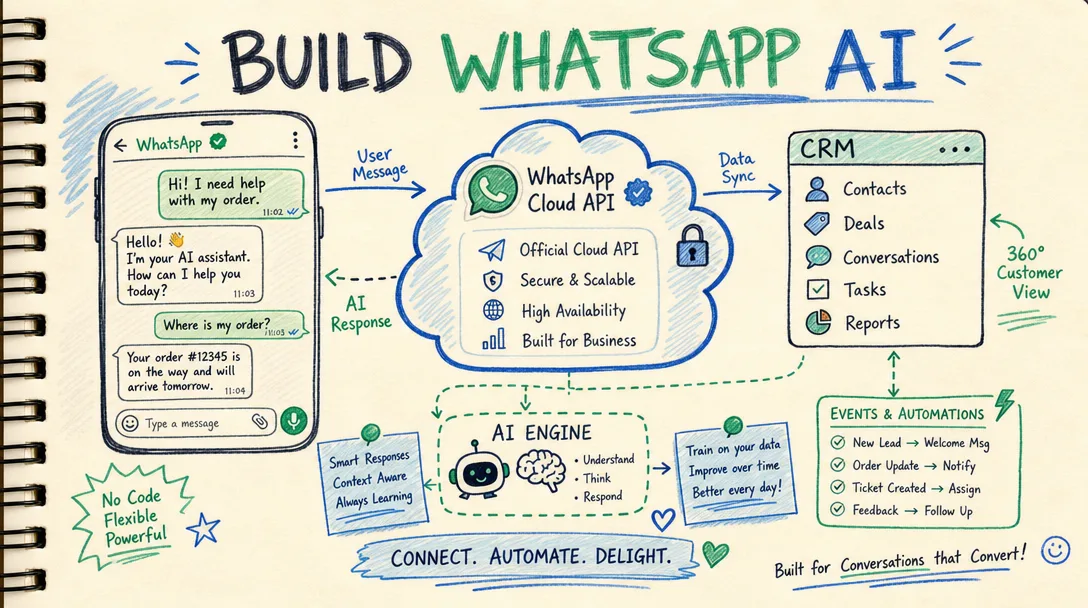
I will build a WhatsApp AI chatbot on the official Cloud API that answers customers 24/7, qualifies leads, and writes every conversation straight into your CRM.
What you get
I design, build, and ship a production WhatsApp chatbot running on Meta's official WhatsApp Cloud API (not an unofficial bridge, not a browser-automation hack that gets your number banned). It combines a conversational AI layer with a real workflow engine, and it pushes structured data into the CRM you already use.
Concrete deliverables:
- A live WhatsApp number connected through the official Cloud API, with your business profile, display name, and verified sender set up correctly in Meta Business Manager (you keep full ownership of the WhatsApp Business Account and Meta assets).
- An AI conversation layer (built on a large language model of your choice — OpenAI, Anthropic Claude, or an open model) that understands free-text questions, replies in your brand voice, and stays grounded in your content rather than making things up.
- A knowledge base / retrieval setup so the bot answers from your real FAQs, pricing logic, policies, product catalog, or docs — not generic guesses. You give me the source material; I structure and embed it.
- Lead capture and qualification flows: the bot collects name, intent, budget, location, or any fields you define, then scores or tags the contact.
- CRM sync: every conversation, contact, and captured field is written to your CRM (HubSpot, Salesforce, Zoho, Pipedrive, GoHighLevel, Airtable, or a custom endpoint via webhook/API). New contacts are created, existing ones are matched and updated, and chat transcripts are logged on the contact record.
- Human handoff: when the bot hits something it shouldn't answer, it escalates to a human — via a shared inbox, an agent assignment in the CRM, or a Slack/email/WhatsApp alert to your team.
- Approved message templates: I draft and submit the utility/marketing templates Meta requires for business-initiated and out-of-24-hour-window messages, and handle the approval process.
- Documentation and a short handover walkthrough so your team can edit answers, read transcripts, and manage the number without me.
Plans
| Feature | Basic | Standard | Premium |
|---|---|---|---|
| Official Cloud API onboarding & number setup | Yes | Yes | Yes |
| AI conversation layer | Scripted + light AI | Full AI with knowledge base | Full AI, multi-intent, multilingual |
| Knowledge base size | Up to ~15 Q&As / 1 doc | Up to ~60 Q&As / several docs | Large / catalog-scale |
| Lead capture fields | Basic (name + intent) | Custom fields & tagging | Advanced scoring & routing |
| CRM sync | Contact + transcript log | Two-way field mapping | Two-way + automation triggers |
| Human handoff | Email/WhatsApp alert | Shared inbox or CRM assignment | Full routing rules + SLA alerts |
| Message templates | 1 template | Up to 3 templates | Up to 8 templates |
| Languages | 1 | 1 | Multiple |
| Revisions | 1 round | 2 rounds | 3 rounds |
| Post-launch support | 7 days | 14 days | 30 days |
All plans include the official Cloud API integration and CRM write-back; the tiers differ in conversational depth, data mapping, and routing sophistication.
How it works
- Discovery call / brief. We confirm your use case, the CRM you use, the questions the bot must handle, and what counts as a qualified lead.
- Access setup. You grant access to (or create) a Meta Business Account and connect a phone number to the WhatsApp Cloud API; you authorize the CRM connection. I guide you through every click.
- Content & flow design. I structure your FAQs, capture fields, escalation rules, and conversation flow, then share them for sign-off before building.
- Build. I implement the AI layer, the knowledge retrieval, the capture logic, the CRM mapping, and the handoff path on a staging number.
- Template submission. I draft and submit the required WhatsApp message templates for Meta approval.
- Testing. We run real conversations together — happy paths, edge cases, "I want a human," and bad input — and I verify each contact lands correctly in your CRM.
- Go live & handover. I switch to your production number, deliver documentation, and walk your team through editing and monitoring.
Why choose this
I use the official WhatsApp Cloud API, so your number is compliant, stable, and not at risk of the bans that follow unofficial QR-scan libraries. The bot is grounded in your own content, so it answers accurately instead of improvising. And because everything syncs to your CRM in real time, your sales team works from one source of truth instead of screenshotting chats. You own all accounts and data; nothing is locked to me.
Who it's for / use cases
- E-commerce & retail answering order status, sizing, returns, and product questions, then capturing the buyer in the CRM.
- Real estate & automotive qualifying inquiries (budget, area, timeline) before a human ever picks up.
- Clinics, salons, and services handling booking questions and routing serious requests to staff.
- Agencies & B2B that need inbound WhatsApp leads logged and scored automatically.
- Education & coaching answering course questions and collecting enrollment intent.
If most of your inbound chats are repetitive and your reps are copy-pasting answers, this pays for itself in saved hours.
FAQ
Q: Is this the official WhatsApp API or an unofficial workaround? It's the official WhatsApp Cloud API from Meta. That means compliance, reliability, and no risk of a ban from unauthorized automation. You keep ownership of the WhatsApp Business Account.
Q: Do I need a Facebook/Meta Business account? Yes. WhatsApp Cloud API requires a Meta Business Account and a verified business. If you don't have one, I'll walk you through creating and verifying it as part of onboarding.
Q: Can the bot really connect to my specific CRM? I support HubSpot, Salesforce, Zoho, Pipedrive, GoHighLevel, Airtable, and any CRM with a public API or webhook. Tell me yours before ordering and I'll confirm the exact field mapping that's possible.
Q: Will it sound like a robot? No. I tune the AI to your brand voice and ground it in your real content, so replies are accurate and on-tone. You review and approve the tone during revisions.
Q: What about costs I pay directly to Meta or the AI provider? Meta charges per-conversation messaging fees and the AI model has usage costs, both billed by those providers directly to your accounts. My work is the build and integration; I'll explain how those third-party charges work so there are no surprises.
Q: Can a human take over a conversation? Yes. I set up escalation so the bot hands off to your team via a shared inbox, a CRM assignment, or an instant alert, and it pauses its own replies once a human steps in.
Q: How long does it take? Most builds go live within the standard delivery window once I have access and content. Template approval by Meta can add a short, out-of-my-control wait, which I'll flag early.
Q: What happens after delivery? Each plan includes a post-launch support window for fixes and tuning, plus documentation so your team can edit answers and read transcripts independently. Ongoing maintenance can be arranged separately.
Reviews★0(0)
No reviews yet — be the first after your purchase.