I will clean, deduplicate and standardize your messy dataset in Excel or Python
About this gig
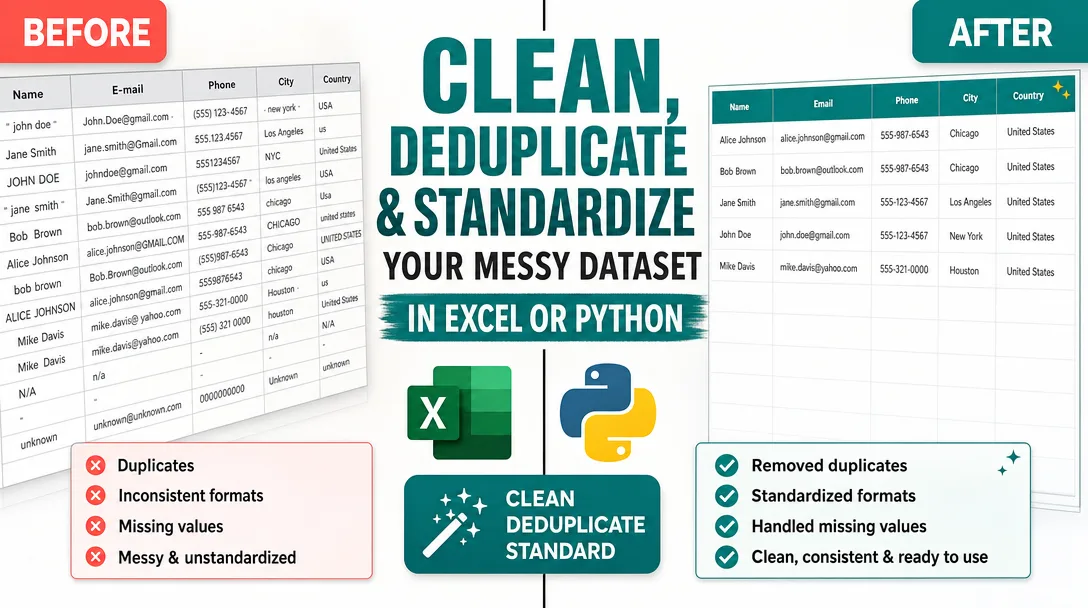
I will clean, deduplicate, and standardize your messy dataset in Excel or Python so it's analysis-ready, consistent, and free of the errors that quietly break reports and dashboards.
If your spreadsheet is full of duplicate rows, inconsistent date formats, stray whitespace, mismatched categories, and half-empty columns, I will turn it into a clean, structured, reliable file you can actually trust.
What you get
I focus on one thing and do it well: taking a messy dataset and making it clean, consistent, and ready for whatever comes next: reporting, import into a CRM, machine learning, or a board deck. Concrete deliverables include:
- A cleaned dataset delivered in your preferred format (XLSX, CSV, Google Sheets, or a database-ready file), with the original left untouched so you always have a fallback.
- Deduplication using exact and fuzzy matching. I catch the obvious duplicates and the sneaky ones too: "Acme Inc." vs "Acme, Inc." vs "ACME INCORPORATED", or the same person entered twice with a typo in the email.
- Standardized formatting across the board: consistent date formats (e.g. YYYY-MM-DD), normalized phone numbers, trimmed whitespace, unified casing for names and categories, and consistent units or currency notation.
- Missing-value handling done transparently. I flag blanks, fill where a rule clearly applies, and never silently invent data. You decide whether gaps are left empty, filled with a default, or marked for review.
- Type correction so numbers stop being stored as text, dates stop being read as strings, and your sort and SUM functions finally behave.
- Validation and outlier flags: invalid emails, impossible dates, negative quantities, out-of-range values, and other red flags surfaced in a separate column or sheet rather than dropped without notice.
- A short change log listing what I cleaned, how many duplicates were removed, which columns were standardized, and any decisions I made along the way. No black box.
- The cleaning script (Python/pandas) on request, so you can re-run the same process on future exports yourself.
Plans
| Feature | Basic | Standard | Premium |
|---|---|---|---|
| Rows covered | Up to ~2,000 | Up to ~20,000 | Up to ~100,000+ |
| Columns | Up to 10 | Up to 25 | Unlimited |
| Remove duplicates (exact) | Yes | Yes | Yes |
| Fuzzy/near-duplicate matching | — | Yes | Yes |
| Standardize dates, text, casing | Yes | Yes | Yes |
| Phone/email/format normalization | Basic | Yes | Yes |
| Missing-value handling | Flag only | Flag + rule-based fill | Custom rules |
| Validation & outlier report | — | Yes | Yes |
| Multiple files / merge & join | — | 1 merge | Multiple |
| Reusable cleaning script (Python) | — | — | Yes |
| Change log / documentation | Brief | Detailed | Detailed + walkthrough |
| Revisions | 1 | 2 | Unlimited (within scope) |
Row and column counts are guides, not hard walls. Send me a sample and I'll tell you exactly which tier fits before you commit.
How it works
- You send the data and the goal. Share the file (or a representative sample if it's sensitive) and tell me what you need it for. "Import into HubSpot," "feed a Power BI dashboard," and "train a model" all imply different cleaning choices.
- I audit it and reply with a plan. Within the first review I tell you what's wrong: duplicate count, format inconsistencies, missing-data hotspots, and any structural issues. You approve the approach and confirm the edge-case rules.
- I clean it. Working on a copy, I deduplicate, standardize, correct types, handle blanks per your rules, and flag anything that needs a human decision.
- I validate. I cross-check totals, row counts, and key fields so the cleaned file reconciles against the original. Nothing should silently disappear.
- You review and I revise. You get the cleaned file plus the change log. If a rule needs adjusting, I refine it within your plan's revisions.
Why choose this
- Honest, transparent process. I never delete or alter data without a documented rule. Every change is logged so you can audit exactly what happened.
- The right tool for the size. Small, one-off files get handled cleanly in Excel/Sheets. Large or recurring jobs get a Python/pandas pipeline that's fast, repeatable, and reusable.
- Fuzzy matching that actually works. Exact-match dedup is easy; the value is in catching the near-duplicates that inflate your counts and skew your reports.
- Built for what's next. I clean with the destination in mind, so the output drops straight into your CRM, BI tool, or model without another round of fixes.
- No invented data. Where information is genuinely missing, I flag it rather than guess. You stay in control of every judgment call.
Who it's for / use cases
- Marketers and sales teams consolidating lead lists, removing duplicate contacts, and standardizing before a CRM import or email campaign.
- Analysts and operations preparing exports for dashboards in Power BI, Tableau, Looker, or plain Excel pivot tables.
- E-commerce and inventory owners unifying product catalogs, SKUs, prices, and supplier feeds from multiple sources.
- Researchers and students cleaning survey responses or scraped data before analysis in Excel, R, or Python.
- Data scientists who need a clean, consistent training set without spending days on tedious preprocessing.
- Finance and admin teams reconciling records from several systems where the same entity appears in several inconsistent forms.
FAQ
Q: What file formats do you accept and deliver? I work with Excel (XLSX/XLS), CSV, TSV, Google Sheets, and JSON. I can also deliver a database-ready file or load directly into a Google Sheet. Tell me your preferred output and I'll match it.
Q: Will you change my original data? No. I always work on a copy and return the cleaned version separately, so your source file stays intact as a reference and fallback.
Q: How do you handle duplicates that aren't exactly identical? On Standard and Premium I use fuzzy matching to catch near-duplicates: slight spelling differences, extra punctuation, swapped name order, or typos in emails. Before merging anything ambiguous, I confirm the matching rules with you.
Q: What about missing values? Will you make up data? Never. I flag blanks clearly. Where a safe rule applies (for example, a default region or a zero quantity you've confirmed), I fill per your instruction. Anything uncertain is marked for your review rather than guessed.
Q: My data is confidential. Can we work around that? Yes. You can send a representative sample or anonymized/masked version so I can build and prove the cleaning process, then you run the finished script on the full file yourself. I'm happy to keep sensitive fields out of scope entirely.
Q: Do I get the script, or just the cleaned file? Basic and Standard deliver the cleaned file and a change log. Premium includes the documented Python/pandas script so you can re-run the exact same cleaning on future exports without re-ordering.
Q: How long does it take? Small files are usually quick; larger or multi-file jobs with merges and custom rules take longer. After I see a sample I'll give you a realistic timeline up front, before any work begins.
Q: What if the result isn't quite right? Each plan includes revisions. If an edge case slipped through or a rule needs tuning, send it back and I'll adjust within your plan's scope. My goal is a file you can use immediately, with no surprises.
Reviews★0(0)
No reviews yet — be the first after your purchase.