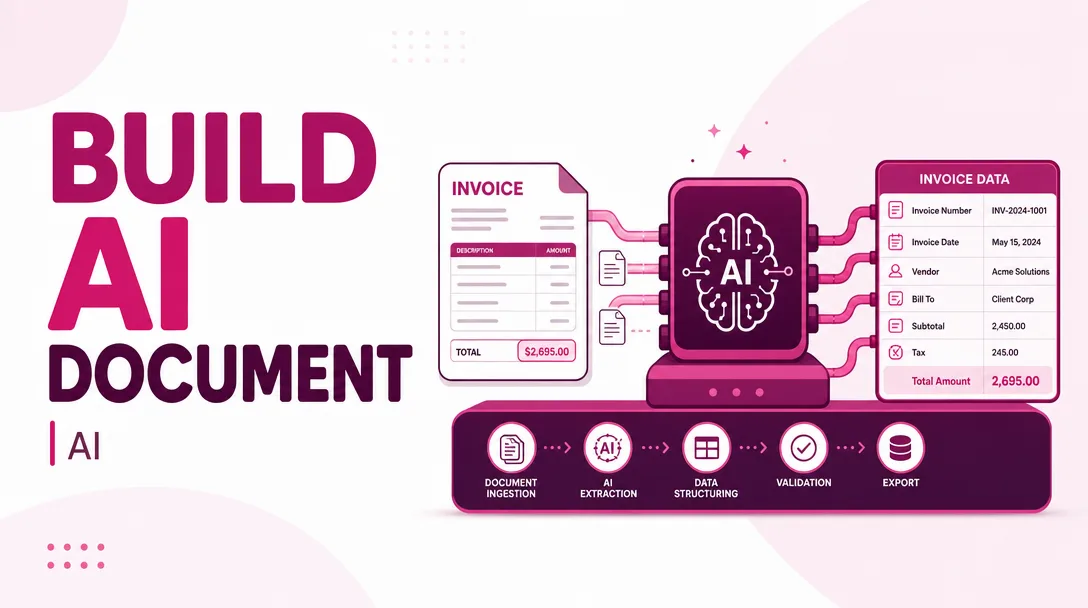
I will build an AI document processing pipeline that extracts and structures invoices
About this gig
Turn messy invoices into clean, structured data. I build an AI document processing pipeline that reads PDFs and scans, extracts every field, and outputs validated JSON or CSV.
What you get
- A working AI document processing pipeline that ingests invoices as PDFs (digital or scanned), images (JPG/PNG), and common email attachments, then returns clean structured data.
- Field-level extraction of the data that actually matters on an invoice: supplier name and address, supplier tax/VAT ID, invoice number, issue date and due date, purchase order number, currency, subtotal, tax/VAT lines, discounts, shipping, and grand total.
- Line-item parsing that breaks the invoice table into rows — description, quantity, unit price, line tax, and line total — so you get the detail, not just the header.
- Structured output in the format you need: normalized JSON (one object per document), flat CSV for spreadsheets, or a direct write into a database table or Google Sheet.
- Validation rules baked into the pipeline: dates normalized to ISO format, numbers parsed with correct decimal and thousands separators, currency detected, and an arithmetic check that confirms line items sum to the stated total (flagging mismatches instead of silently passing them through).
- A confidence score per field plus a review flag, so low-certainty extractions can be routed to a human instead of trusted blindly.
- An intake mechanism that fits your workflow — a watched folder, an upload endpoint, an email inbox the pipeline monitors, or a simple API you can POST documents to.
- Clear documentation: how the pipeline runs, how to add new vendors or fields, the output schema, and how to re-run failed documents.
- A handover call and source code for the components I build, so you are never locked in or dependent on me to keep it running.
Plans
| Feature | Basic | Standard | Premium |
|---|---|---|---|
| Document types | Digital PDF invoices | Digital + scanned/image invoices | Digital, scanned, multi-page, mixed batches |
| Fields extracted | Core header fields | Header + full line items | Header + line items + custom fields you define |
| Output format | JSON or CSV | JSON, CSV, or Google Sheet | Any of these + direct DB / API delivery |
| Validation | Type & date normalization | + arithmetic / total checks | + custom business rules & duplicate detection |
| Intake | Manual upload / folder | Upload endpoint or email inbox | Full automated pipeline with watched source |
| Confidence scoring | Basic flagging | Per-field confidence | Per-field + human-review routing queue |
| Sample documents handled | Single vendor layout | A few vendor layouts | Many / varied vendor layouts |
| Revisions | 1 round | 2 rounds | 3 rounds |
| Support after delivery | 7 days | 14 days | 30 days |
How it works
- Discovery. You send me 5–15 real sample invoices (anonymized if needed) and tell me where the data needs to end up — a spreadsheet, a database, an accounting tool, or an API. We agree on the exact field list and output schema.
- Schema design. I define the output structure: field names, types, formats, and validation rules. You approve it before I build anything, so there are no surprises at delivery.
- Pipeline build. I assemble the extraction pipeline — document ingestion, OCR for scanned files, an AI extraction layer prompted and tuned for your invoice layouts, and a parsing/normalization stage that turns raw model output into clean typed data.
- Validation layer. I add the checks: date and number normalization, currency detection, total reconciliation, and confidence scoring so questionable results are flagged rather than trusted.
- Testing against your samples. I run your real documents through the pipeline, compare the output against the correct values, and iterate until accuracy is solid across your vendor layouts.
- Delivery and handover. I deliver the pipeline, the output in your chosen format, documentation, and a walkthrough so your team can run it, extend it, and troubleshoot it independently.
Why choose this
Manual invoice entry is slow, error-prone, and scales badly — every new vendor and every busy month adds work. This pipeline does the repetitive reading for you and, just as importantly, tells you when it is unsure. I focus on honest accuracy: rather than claiming a magic 100% rate, I build in validation and confidence scoring so you can trust the clean results and catch the edge cases. You get a system tuned to your actual invoices, not a generic demo, plus the source code and documentation to own it long-term. I have built extraction and parsing workflows around real, inconsistent business documents, so I plan for the messy reality: rotated scans, missing fields, multi-page tables, and vendors who format totals five different ways.
Who it's for / use cases
- Finance and accounts-payable teams drowning in PDF invoices who want them flowing into their ledger or ERP automatically.
- Bookkeeping and accounting firms processing invoices for many clients and many vendor formats.
- E-commerce and logistics operations reconciling supplier invoices against purchase orders at volume.
- Startups and SMBs that want to replace copy-paste data entry before it becomes a full-time job.
- Developers and product teams who need an invoice-extraction component dropped into a larger app or workflow.
- Operations teams building an audit trail who need consistent, queryable invoice data instead of a folder of PDFs.
FAQ
Q: How accurate is the extraction? Accuracy depends heavily on document quality and how consistent your vendor layouts are. Clean digital PDFs typically extract very reliably; scanned or photographed documents are harder. That is exactly why I include per-field confidence scoring and validation — so uncertain results are flagged for review rather than passed off as correct.
Q: Can it handle scanned and photographed invoices, not just digital PDFs? Yes, on the Standard and Premium plans I include an OCR stage for scanned files and images. Very low-resolution or heavily skewed scans will always be harder, and I'll tell you honestly during testing where the limits are with your specific documents.
Q: What output formats can I get? JSON and CSV on every plan. Standard adds direct writing to a Google Sheet, and Premium can deliver straight into a database table or an API endpoint you specify. We agree on the exact schema up front.
Q: Do I get the source code, or am I locked in? You get the source code for the components I build, plus documentation. The pipeline is yours to run, host, and extend. No lock-in and no dependence on me to keep it operating.
Q: How many different vendor layouts can it handle? Basic targets a single layout, Standard a few, and Premium a wide range of varied formats. The pipeline is designed so new layouts can be added over time — the discovery step is where we scope how many you need covered at launch.
Q: What do you need from me to start? A representative set of real sample invoices (anonymized is fine), the list of fields you care about, and a clear idea of where the data should end up. The more variety in your samples, the better I can tune and test the pipeline.
Q: Does it run in the cloud or on my own infrastructure? Either. I can deliver it to run on your infrastructure or a cloud environment you control. If your invoices contain sensitive data, we can keep processing within boundaries you define and discuss data handling before any documents are shared.
Q: What happens to documents the pipeline isn't confident about? They are flagged by the validation and confidence layer. On Premium I can route them into a dedicated review queue so a person can confirm or correct them, while the high-confidence documents flow through automatically.
Reviews★0(0)
No reviews yet — be the first after your purchase.